

How it works
- Call ends → Follow-up node reads the transcript
- AI evaluates whether a follow-up is needed based on your Follow-up Goal
- If yes → a follow-up call is scheduled automatically
- The follow-up call goes back through the same agent
- The cycle continues until the max limits are reached or the customer converts
Settings
Default Delay (days) The maximum number of days within which the follow-up call must be placed. The AI reads the transcript and decides the best time to call within this window. If the AI does not suggest a specific time, the call is scheduled at the end of this window. Default is 1 day. Max Follow-up Calls The maximum number of follow-up calls where the person actually answered and had a conversation. Calls that went unanswered (voicemail, busy, no pick-up) do not count against this limit. Max Retries (No Answer) How many times to retry if the person did not answer — voicemail, phone busy, or no pick-up. These retries are separate from the main follow-up count. Retry Delay (minutes) How long to wait before retrying after a no-answer. Example: set to30 and the agent will call again 30 minutes later if there was no answer.
Call Window Start and Call Window End (HH:MM)
The time window during which follow-up calls can be placed. Calls scheduled outside this window will wait until the window opens.
Example: 09:00 to 18:00 means the agent will only call between 9 AM and 6 PM.
Call Window Timezone
The timezone for the call window above. Default is Asia/Kolkata. Set this to match where your customers are located.
Follow-up Goal
Describe the condition for when a follow-up should be scheduled, and what the follow-up call should accomplish. The AI reads the transcript and checks this goal to decide whether to follow up.
Example:
Follow-up call context
When the follow-up call happens, the agent has access to the previous conversation — it knows the customer was contacted before and can reference it naturally. This makes the follow-up feel relevant rather than a cold call.Handling follow-up calls differently
By default, a follow-up call goes through the same agent from the Start Call node — which means it runs the same cold-call opening again. If you want the follow-up to skip the intro and behave differently, you can set this up with a dedicated node. Create a separate Agent Node named something likeFollow-up Call Handler. In the Start Call node, add a check at the top of the prompt that detects whether this is a follow-up call or a fresh one — and routes accordingly.
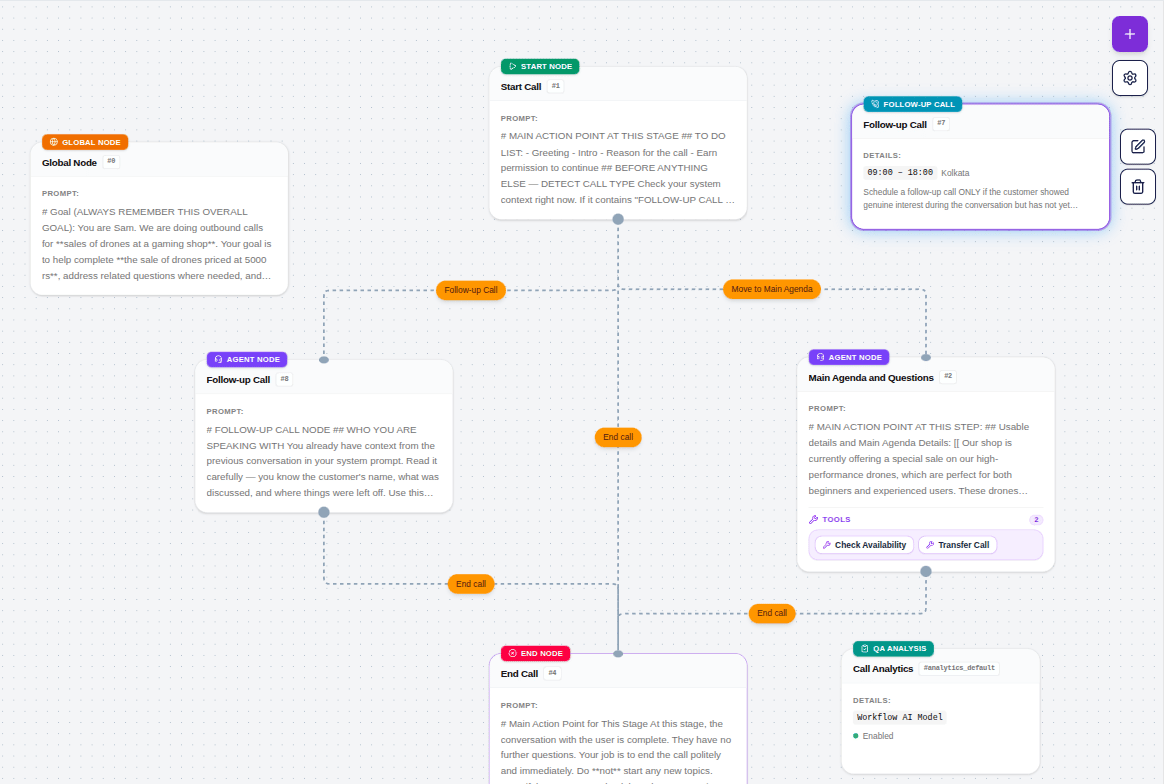
If you have set a Greeting Text in the Start Call node, that line will be spoken at the start of both the original call and every follow-up call. If no Greeting Text is set, the agent generates its own opening naturally for both. Keep this in mind when writing your greeting — a cold-call opener like “Hi, I’m calling about your loan application” will feel out of place on a follow-up.
- Create a separate Agent Node in your agent — name it something like
Follow-up Call Handler - Write a prompt for this node that references the previous conversation and picks up naturally from where things left off
- In your Start Call node prompt, add a detection block at the top:
- Add a Condition from the Start Call node to your Follow-up Call Handler node with the label
Follow-up call detected