

Creating a Campaign
Go to Operations → Campaigns and click New Campaign. Fill in the following: Campaign Name A label to identify this campaign in your dashboard. Agent The agent that will handle the calls. Select from your active agents. Telephony Configuration The phone number and provider used to make the calls. Set this up in Integrations first. Contacts (CSV) Upload a CSV file with your contact list. Each row is one contact. Map the columns to the fields your agent’s prompt uses — at minimum, a phone number column is required.Template variables like
{{customer_name}} in your agent’s prompt must match column names in the CSV. Built-in variables like {{current_date}} are resolved automatically and do not need a CSV column.Advanced Settings
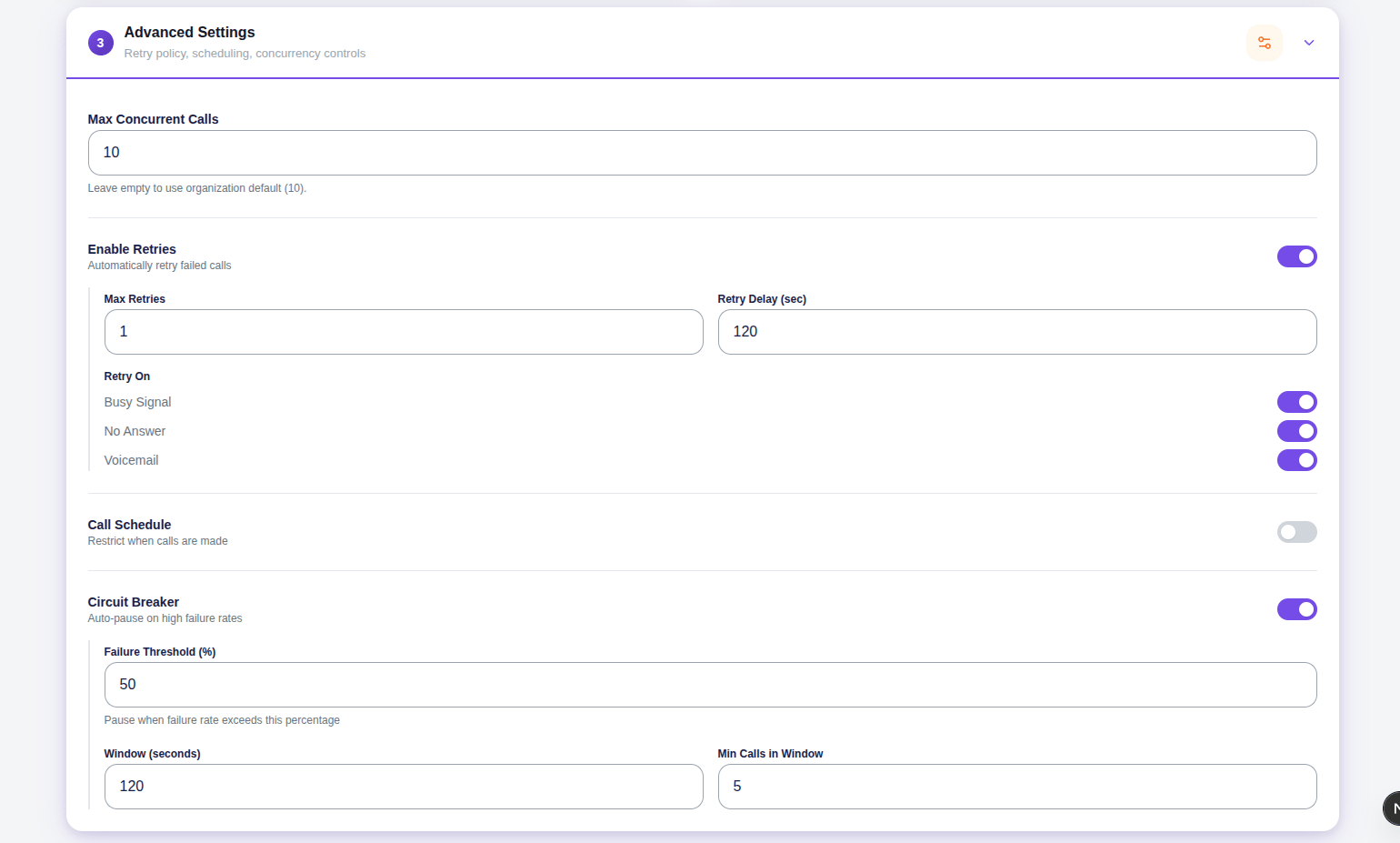
Max Concurrent Calls
How many calls the campaign runs simultaneously. Leave empty to use the organisation default. The actual limit is also capped by the number of outbound phone numbers available on your telephony configuration.Retries
When turned on, the campaign automatically retries contacts who could not be reached. Max Retries — How many times to retry a contact. Default is 2. Retry Delay (seconds) — How long to wait before retrying. Default is 120 seconds (2 minutes). Retry On — Choose which outcomes trigger a retry:- Busy Signal — The line was busy when called
- No Answer — The contact did not pick up
- Voicemail — The call went to voicemail
Call Schedule
When turned on, the campaign restricts outbound calls to specific days and time windows. Calls scheduled outside the allowed window are held and placed when the window opens. Add time slots by selecting a day and a start/end time. You can add multiple slots for different days. Set the timezone so the schedule reflects your contacts’ local time.Circuit Breaker
The circuit breaker automatically pauses the campaign if the failure rate crosses a threshold within a recent window. This prevents the campaign from burning through a contact list if something is wrong — a bad number list, a misconfigured agent, or a telephony issue. Failure Threshold (%) — If the failure rate exceeds this percentage, the campaign pauses. Default is 50%. Window (seconds) — The time window over which the failure rate is calculated. Default is 120 seconds. Min Calls in Window — The minimum number of calls that must be made within the window before the circuit breaker can trigger. Prevents false pauses at the very start of a campaign when the sample size is small. Default is 5. Example — with defaults (Threshold 50%, Window 120s, Min Calls 5):- In the last 120 seconds, 10 calls were made. 6 failed → 60% failure rate → exceeds 50% → campaign pauses
- In the last 120 seconds, 10 calls were made. 4 failed → 40% failure rate → under threshold → campaign continues
- In the last 120 seconds, only 3 calls were made. All 3 failed → but Min Calls (5) not reached yet → circuit breaker does not trigger