> ## Documentation Index
> Fetch the complete documentation index at: https://docs.voicerix.ai/llms.txt
> Use this file to discover all available pages before exploring further.
# Follow-up
> Automatically schedule follow-up calls after a conversation based on the outcome.
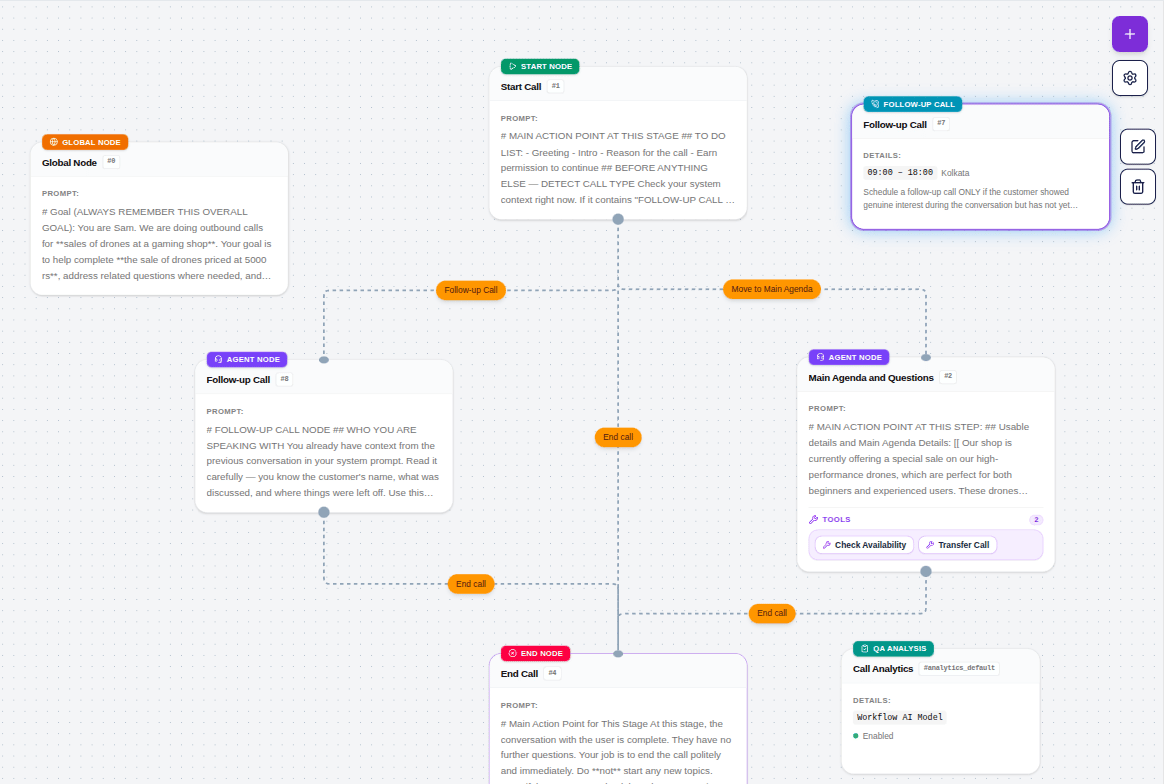
The **Follow-up** node runs after a call ends and decides whether a follow-up call should be scheduled. The decision is made by AI — it reads the conversation transcript and evaluates it against the goal you define. If the condition is met, Voicerix automatically schedules the next call.
You do not need to manually create follow-up tasks. The node handles it entirely on its own.
## How it works
1. Call ends → Follow-up node reads the transcript
2. AI evaluates whether a follow-up is needed based on your **Follow-up Goal**
3. If yes → a follow-up call is scheduled automatically
4. The follow-up call goes back through the same agent
5. The cycle continues until the max limits are reached or the customer converts
## Settings
**Default Delay (days)**
The maximum number of days within which the follow-up call must be placed. The AI reads the transcript and decides the best time to call within this window. If the AI does not suggest a specific time, the call is scheduled at the end of this window. Default is 1 day.
**Max Follow-up Calls**
The maximum number of follow-up calls where the person actually answered and had a conversation. Calls that went unanswered (voicemail, busy, no pick-up) do not count against this limit.
**Max Retries (No Answer)**
How many times to retry if the person did not answer — voicemail, phone busy, or no pick-up. These retries are separate from the main follow-up count.
**Retry Delay (minutes)**
How long to wait before retrying after a no-answer. Example: set to `30` and the agent will call again 30 minutes later if there was no answer.
**Call Window Start** and **Call Window End** (HH:MM)
The time window during which follow-up calls can be placed. Calls scheduled outside this window will wait until the window opens.
Example: `09:00` to `18:00` means the agent will only call between 9 AM and 6 PM.
**Call Window Timezone**
The timezone for the call window above. Default is `Asia/Kolkata`. Set this to match where your customers are located.
**Follow-up Goal**
Describe the condition for when a follow-up should be scheduled, and what the follow-up call should accomplish. The AI reads the transcript and checks this goal to decide whether to follow up.
Example:
```
Schedule a follow-up ONLY if the customer showed interest but has not yet committed or completed the process.
Follow up if the customer:
- Asked questions but did not give a final answer
- Said they need more time to decide
- Asked to be called back
Do NOT follow up if the customer:
- Clearly said no or not interested
- Already completed the process
- Asked not to be called again
```
The more specific your Follow-up Goal, the more accurately the AI decides whether to follow up. Vague goals lead to unnecessary calls.
## Follow-up call context
When the follow-up call happens, the agent has access to the previous conversation — it knows the customer was contacted before and can reference it naturally. This makes the follow-up feel relevant rather than a cold call.
***
## Handling follow-up calls differently
By default, a follow-up call goes through the same agent from the Start Call node — which means it runs the same cold-call opening again. If you want the follow-up to skip the intro and behave differently, you can set this up with a dedicated node.
Create a separate **Agent Node** named something like `Follow-up Call Handler`. In the Start Call node, add a check at the top of the prompt that detects whether this is a follow-up call or a fresh one — and routes accordingly.
If you have set a **Greeting Text** in the Start Call node, that line will be spoken at the start of both the original call and every follow-up call. If no Greeting Text is set, the agent generates its own opening naturally for both. Keep this in mind when writing your greeting — a cold-call opener like "Hi, I'm calling about your loan application" will feel out of place on a follow-up.
**How to set it up:**
1. Create a separate **Agent Node** in your agent — name it something like `Follow-up Call Handler`
2. Write a prompt for this node that references the previous conversation and picks up naturally from where things left off
3. In your **Start Call** node prompt, add a detection block at the top:
```
## BEFORE ANYTHING ELSE — DETECT CALL TYPE
Check your system context right now.
If it contains "FOLLOW-UP CALL — PREVIOUS CONVERSATION" at the top:
→ This is a follow-up call. Do NOT run the cold call script below.
→ Move immediately to the Follow-up Call Handler node.
Do not greet, do not introduce yourself, just transition.
If no such section exists:
→ This is a fresh call. Follow the script below normally.
```
4. Add a **Condition** from the Start Call node to your Follow-up Call Handler node with the label `Follow-up call detected`
When the follow-up call comes in, the agent detects the context, skips the cold opening, and jumps straight to the follow-up node — making the experience feel natural and continuous.